Command Parameters
Command parameters limit the value of a calculation for a UIS command.
Currently, command parameters only exist for the Estimate Hourly Accumulation calculation, where default parameters are used to delimit a specified time frame.
For related information, see Configuring UIS Command Properties.
To Edit Command Parameters
- Open the Properties dialog box for the GcmCalc device you want to alter.
- Click UIS Commands and either double-click an existing UIS command or click in the white space of the UIS Commands field and click Add.
- On the UIS Command Properties dialog box, either double-click an existing Calculation or if you want to add a new calculation click Add.
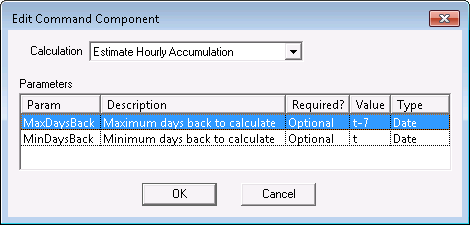
- On the Edit Command Component dialog box, open the Calculation drop-down menu and view an existing calculation or select a new one. Available parameters appear in the Parameters table.
Note: At this time, the only calculation that displays parameters is Estimate Hourly Accumulation. Parameters include MaxDaysBack and MinDaysBack.
- In the Parameters table, highlight and double-click a parameter to add a new value.
- On the Modify Parm dialog box, enter a new value in the New Value field and click OK. The value must be a wildcard-based date; absolute values will result in a failed calculation.
|
| Sample UIS Command Calculation Parameters Dialog Box |

